The Podcast at Delphi.org

The Podcast at Delphi.org

About the Delphi programming language, tools, news and community

The Podcast at Delphi.org RSS Feed


Update on Explore Tool

MikeG reported that he wasn’t able to get the Explore Tool in Delphi to work in XP.  I tried it on XP today and it worked fine.  It might be that something was missed.  Here is a nice reference of the important bits from that screen cast:

Go to Tools / Configure Tools / Add
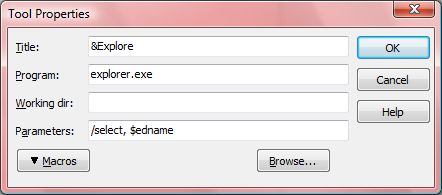
Adding an Explore Tool

The Title can be anything you want.  The program is Explorer (the .exe is optional) and the parameters must be /select, $edname (be sure you remember the comma!)

That should do it for you to open an explorer window with the currently edited file selected.

Update: More explorer parameters.

5 Responses to “Update on Explore Tool”

  1. 1
    David Heffernan:

    Title=&Explore has a bad choice for accelerator since it clashes with &Editor options (at least it does on my decrepit Delphi 6 install). E&xplore would be better.

    Nice tip though. By the way, what’s your recommended source for explorer.exe command line parameters. I remember looking for info on that quite a while ago and drawing a blank.

  2. 2
    Jim McKeeth:

    Seems like there were more parameters, but this is the best I have been able to find. Maybe the others were removed or are undocumented.

    http://support.microsoft.com/kb/152457

    Explorer [/n] [/e] [(,)/root,] [/select,]

    /n Opens a new single-pane window for the default
    selection. This is usually the root of the drive
    Windows is installed on. If the window is already
    open, a duplicate opens.

    /e Opens Windows Explorer in its default view.

    /root,

    Opens a window view of the specified object.

    /select,

    Opens a window view with the specified folder,
    file or application selected.

  3. 3
    Issam Ali:

    Hi,
    I have another idea, use $PATH($PROJECT)
    see my old post:
    http://www.blog.issamsoft.com/?q=en/node/10
    or if you wish you can use $PATH($edname) to deal with single file.

  4. 4
    Jim McKeeth:

    @Issam: “$PATH($PROJECT)” would get you to the directory, but “/select, $edname” actually selects the current file in that directory. Very handy if you have a lot of files in your project or actually want to operate on that file.

  5. 5
    Issam Ali:

    @Jim: You are right, “/select, $edname” is more handy, Updated.

Leave a Reply